You’ve heard the term “event schema” thrown around in analytics meetings. Everyone nods like they understand it. But what does it actually mean? And why should you, as a marketer, care about it?
Here’s the short answer: an event schema is the blueprint for how you track user actions on your website or app. Get it right, and you’ll have clean, actionable data. Get it wrong, and you’ll spend months untangling messy reports that tell you nothing useful.
I’ve implemented event schemas for dozens of companies—from small e-commerce stores to enterprise SaaS platforms. The difference between a well-designed schema and a chaotic one? It’s the difference between knowing exactly why your conversions dropped 20% last week and staring at dashboards hoping for answers.
This guide breaks down everything you need to know about event schemas. No jargon. No assumptions. Just practical knowledge you can apply today.
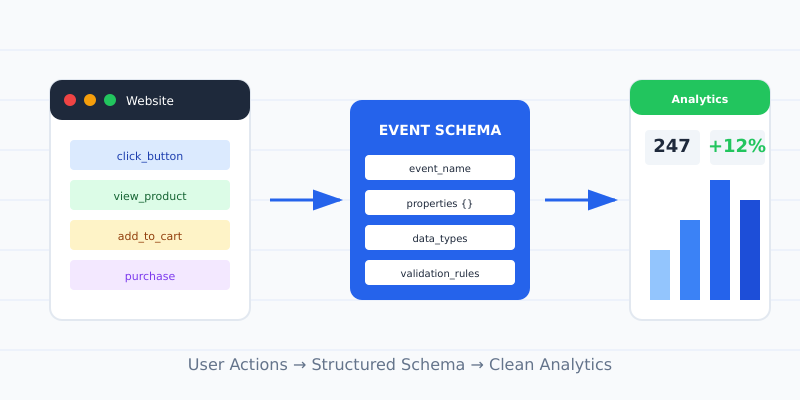
What is an Event Schema?
An event schema is a structured framework that defines what user actions you track and how you track them. Think of it as a dictionary for your analytics data.
Every time a user does something on your site—clicks a button, views a product, completes a purchase—that’s an event. The schema tells your analytics tool:
- → What to call the event (the event name)
- → What details to capture (the event properties/parameters)
- → When to fire the event (the trigger conditions)
Without a schema, teams end up with events named click1, button_click_new, and Click - Homepage CTA (OLD). Six months later, nobody knows what any of them mean.
A proper analytics event schema looks like this:
| Event Name | Description | Key Properties |
|---|---|---|
product_viewed |
User views a product detail page | product_id, product_name, price, category |
add_to_cart |
User adds item to shopping cart | product_id, quantity, cart_value |
purchase_completed |
User completes checkout | order_id, total_value, payment_method |
Clear. Consistent. Useful.
How Event Schemas Work
Event schemas work through a simple flow: definition, implementation, and validation.
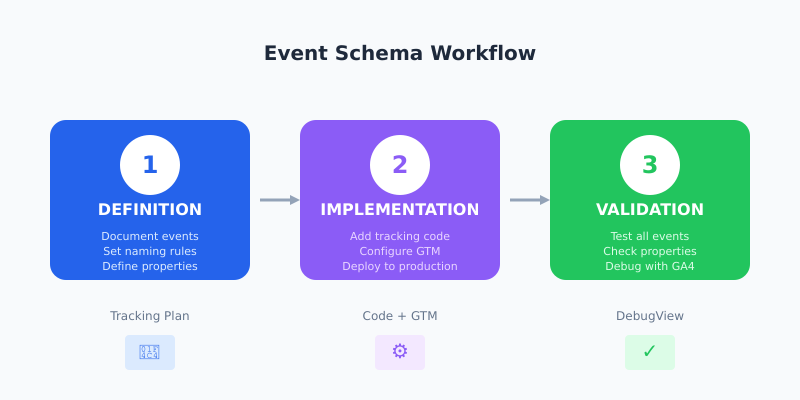
1. Definition
First, you document every event you want to track. This happens in a tracking plan—a spreadsheet or document that lists all events, their properties, and when they should fire. Tools like Avo make this process easier by providing structured templates and automatic validation against your implementation.
For each event, you define:
- → Event name: Use a consistent event naming convention like
action_object - → Properties: The data points attached to each event
- → Data types: Is that property a string, number, or boolean?
- → Required vs optional: Which properties must always be present?
2. Implementation
Developers (or you, via Google Tag Manager) implement the tracking code based on your schema. GTM is particularly valuable for marketers because it lets you add event tracking without touching your site’s codebase.
In GA4, this looks like:
gtag('event', 'purchase_completed', {
  order_id: 'ORD-12345',
  total_value: 149.99,
  currency: 'USD',
  payment_method: 'credit_card'
});
3. Validation
After implementation, you verify that events fire correctly with the right properties. GA4’s DebugView shows events in real-time as they occur, making it easy to spot missing properties or incorrect values. For more comprehensive monitoring, Trackingplan automatically detects schema violations across your entire analytics stack.
Why Event Schemas Matter for Marketers
You might think schemas are a “developer thing.” They’re not. Here’s why marketers should care:
Better Attribution
A solid event tracking schema lets you track the full customer journey. You’ll see which touchpoints drive conversions—not just the last click. When your schema captures email_link_clicked, ad_clicked, and organic_search_landed, you can finally answer “which channel actually works?”
Accurate Reporting
Messy event data means messy reports. I’ve seen teams where the same action was tracked three different ways across mobile, desktop, and app. Their “total signups” number was always wrong. A unified schema eliminates this chaos.
Faster Insights
When GA4 events are named consistently, you don’t waste time decoding what conv_v2_final means. You search for purchase_completed, find it instantly, and get your answer in minutes instead of hours.
Smarter Segmentation
Event properties enable powerful audience segments. Track product_category with every product_viewed event, and suddenly you can target “users who viewed running shoes but didn’t buy.” Without that property in your schema, this segment is impossible to create.
How to Create an Event Schema: Step-by-Step
Here’s the process I use with clients. It works for startups and enterprises alike.
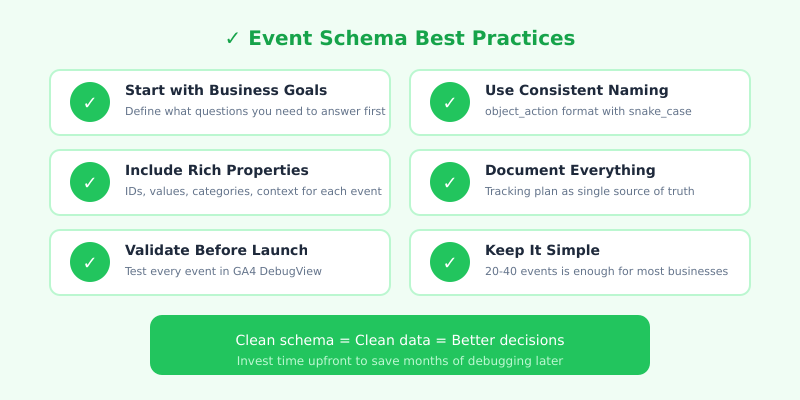
Step 1: Start with Business Goals
Don’t start by listing every possible click. Start by asking: what questions do we need to answer?
Common marketing questions:
- ◆ Which campaigns drive the most revenue?
- ◆ Where do users drop off in our funnel?
- ◆ What content leads to signups?
- ◆ Which product categories perform best?
Each question implies specific events you need to track. This is the foundation of a solid tracking plan.
Step 2: Map Your User Journey
Sketch the key stages of your customer journey. For an e-commerce site:
- 1 Awareness: Landing page views, blog reads
- 2 Consideration: Product views, category browsing, search queries
- 3 Decision: Add to cart, wishlist, comparison
- 4 Purchase: Checkout steps, payment, confirmation
- 5 Retention: Account creation, repeat visits, reviews
Identify 3-5 key events for each stage. Resist the urge to track everything—50+ events become unmanageable.
Step 3: Define Naming Conventions
Pick a format and stick to it. Common patterns:
| Pattern | Example | Best For |
|---|---|---|
object_action |
product_viewed |
GA4 recommended events |
action_object |
view_product |
Mixpanel, Amplitude |
Category - Action |
Ecommerce - Purchase |
Legacy systems |
My recommendation: use object_action with snake_case. It aligns with GA4’s recommended events and reads naturally.
Step 4: Specify Event Properties
For each event, list the properties that add context. A purchase_completed event without order_value is nearly useless.
Essential properties to consider:
- ✓ Identifiers: product_id, user_id, order_id
- ✓ Values: price, quantity, total_value
- ✓ Categories: product_category, content_type, campaign_name
- ✓ Context: page_location, device_type, traffic_source
Step 5: Document Everything
Create a tracking plan document. A simple spreadsheet works, but if you’re managing complex implementations, Segment Protocols provides built-in schema enforcement that validates data as it flows through your pipeline.
| Event | Property | Type | Required | Example |
|---|---|---|---|---|
| purchase_completed | order_id | string | Yes | “ORD-12345” |
| purchase_completed | total_value | number | Yes | 149.99 |
| purchase_completed | currency | string | Yes | “USD” |
| purchase_completed | coupon_code | string | No | “SAVE20” |
Share this with developers, analysts, and anyone who touches your data. It’s your single source of truth.
Common Event Schema Mistakes
I’ve audited hundreds of analytics setups. These mistakes appear constantly:
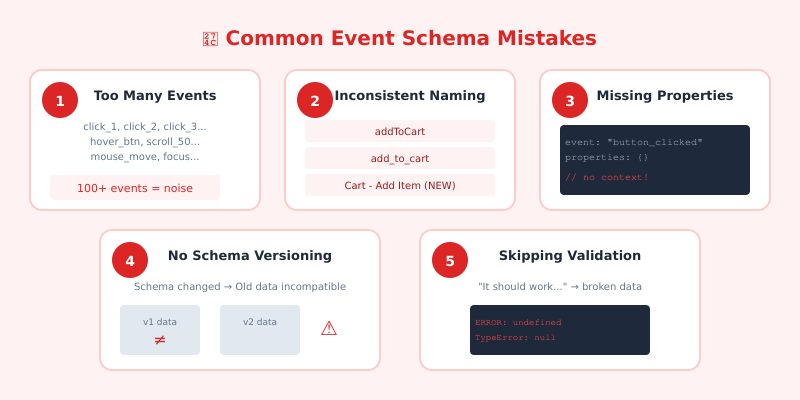
1. Tracking Too Many Events
More events ≠ more insights. Tracking every hover, scroll, and micro-interaction creates noise. Focus on events that answer business questions. If you can’t explain why an event matters, don’t track it.
2. Inconsistent Naming
When one developer uses addToCart, another uses add_to_cart, and a third uses cart_add, your data fragments into unusable pieces. Enforce naming conventions from day one.
3. Missing Properties
An event without context is a missed opportunity. button_clicked tells you nothing. button_clicked with properties button_text: "Start Free Trial" and page: "/pricing" tells you everything.
4. No Versioning
Schemas evolve. When you change an event structure, old data becomes incompatible with new reports. Document schema versions and migration dates so analysts can account for changes.
5. Skipping Validation
Assuming tracking “just works” is dangerous. Test every event after implementation. Check that properties contain expected values. One typo in the code can silently break weeks of data.
FAQ
What’s the difference between an event schema and a tracking plan?
They’re closely related but slightly different. An event schema defines the structure—event names, properties, and data types. A tracking plan includes the schema plus implementation details: where events fire, who’s responsible, and the development timeline. Think of the schema as the “what” and the tracking plan as the “what + how + when.”
How many events should I track?
Most businesses need 20-40 events to answer their key questions. Start with 10-15 core events aligned to your funnel stages. Add more only when you have a clear use case. Tracking 100+ events usually signals poor planning, not thoroughness.
Do I need a developer to implement an event schema?
Not always. Google Tag Manager lets marketers implement many events without code. However, complex events—like dynamic e-commerce data or app tracking—typically require developer support. The schema itself should be created collaboratively between marketing and development.
How often should I update my event schema?
Review your schema quarterly or when launching major features. Avoid constant changes—each modification requires implementation work and can break historical comparisons. Document all changes with dates and reasons.
Can I use GA4’s recommended events or should I create custom ones?
Use GA4’s recommended events whenever they fit your needs. Events like purchase, add_to_cart, and sign_up come with built-in reporting benefits. Create custom events only for actions that recommended events don’t cover.