Your analytics show 1,000 conversions. Your actual sales say 1,500. Where did 500 customers disappear?
They didn’t disappear. Your tracking just never saw them. Ad blockers, Safari’s ITP, Firefox’s Enhanced Tracking Protection — they’re all eating your data. I’ve audited analytics setups where client-side tracking captured only 55% of actual conversions. That’s not a rounding error. That’s flying blind.
Server-side tracking fixes this by moving data collection from the browser to your server. I’ve implemented this for e-commerce sites, SaaS platforms, and lead gen businesses. The results are consistent: 25-40% more conversions tracked, better attribution data, and marketing decisions based on reality instead of incomplete samples.
This guide explains how server-side tracking works, what it costs, and whether it’s worth it for your business.
What is Server-Side Tracking?
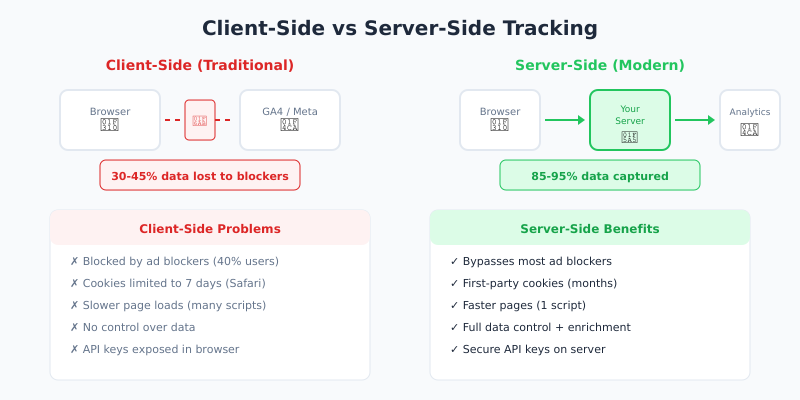
Server-side tracking collects website data through your server instead of the visitor’s browser. When someone clicks “Buy Now,” your server captures that event and sends it to analytics platforms — not a JavaScript snippet that might get blocked.
Here’s the traditional client-side flow:
- 1 Visitor loads your page
- 2 Browser runs tracking JavaScript
- 3 Script sends data directly to Google/Meta/etc.
- 4 Ad blocker intercepts → data lost
And here’s server-side:
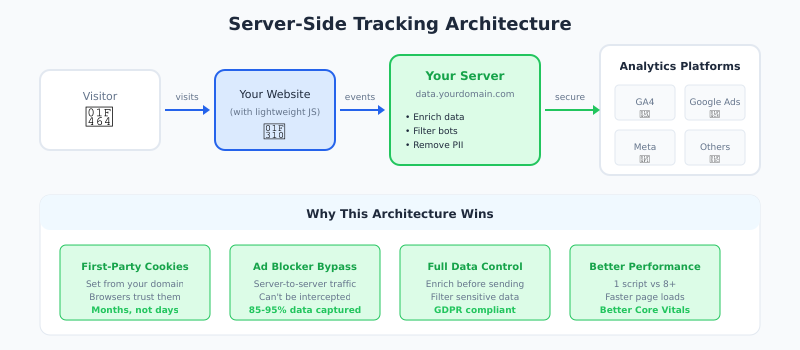
- 1 Visitor loads your page
- 2 Minimal JS sends event to YOUR server
- 3 Your server processes and enriches data
- 4 Your server sends to analytics platforms
The key difference: data flows through infrastructure you control. Ad blockers can’t intercept server-to-server communication.
Why Client-Side Tracking is Failing
Three forces are killing browser-based tracking:
Ad Blockers Are Everywhere
According to recent research, over 40% of internet users run ad blockers. These don’t just block ads — they block tracking scripts from Google Analytics, Meta Pixel, and most marketing tools. That’s 40% of your visitors invisible to your analytics.
Browsers Are Restricting Cookies
Safari’s Intelligent Tracking Prevention (ITP) limits first-party cookies to 7 days. Firefox blocks third-party cookies entirely. Chrome is rolling out similar restrictions. Your attribution windows? They’re shrinking from months to days.
iOS Changed Everything
Apple’s App Tracking Transparency devastated mobile tracking. But it also affects web tracking — Safari is the default browser for hundreds of millions of users, and it’s the strictest on privacy.
The result: your carefully built attribution models break. Your conversion data becomes unreliable. You’re optimizing campaigns based on maybe half the actual picture.
Server-Side vs Client-Side: Complete Comparison
| Factor | Client-Side | Server-Side |
|---|---|---|
| Data Accuracy | 55-70% (ad blockers) | 85-95%+ |
| Setup Complexity | Easy (copy-paste) | Moderate to complex |
| Page Speed Impact | Higher (5-10 scripts) | Lower (1 script) |
| Data Control | Limited | Full control |
| Cookie Lifespan | 7 days (Safari ITP) | Months (first-party) |
| Monthly Cost | Free | $50-500+ |
| Privacy Compliance | Harder | Easier (data control) |
For most businesses, the choice isn’t either/or. A hybrid approach — minimal client-side collection feeding into server-side processing — works best.
Key Benefits of Server-Side Tracking
Recover Lost Conversion Data
When I implemented server-side tracking for an e-commerce client, their recorded conversions jumped from 1,200 to 1,650 per month. Same traffic, same actual sales — just 37% more visibility into what was happening. That’s not extra conversions; that’s conversions that were always happening but never tracked.
Faster Page Load Times
Instead of loading 8 tracking scripts in the browser, you load one lightweight script. Everything else happens server-side. One client saw their Largest Contentful Paint improve by 400ms after moving to server-side tracking. That’s not just user experience — it affects Core Web Vitals and SEO.
First-Party Cookies That Actually Work
When cookies are set from tracking.yourdomain.com (your server), they’re first-party cookies. Browsers trust these. Safari gives them longer lifespans. You can actually track user journeys across sessions instead of treating every visit as a new user.
Data Enrichment Before Sending
Before data reaches Google or Meta, you can:
- ✓ Add CRM data (customer segment, lifetime value)
- ✓ Remove PII for compliance
- ✓ Standardize formats across platforms
- ✓ Filter out bot traffic
Better Security
API keys and tokens stay on your server. With client-side tracking, anyone can view source and see your credentials. Server-side keeps sensitive data where it belongs.
How Much Does Server-Side Tracking Cost?
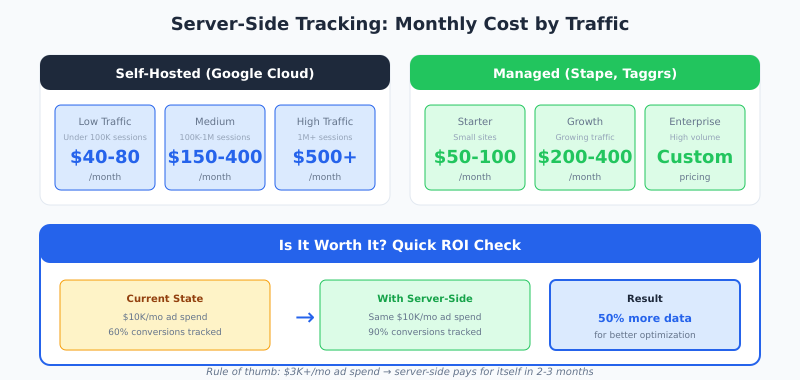
Real numbers based on implementations I’ve done:
Self-Hosted (Google Cloud Platform)
- → Low traffic (<100K sessions/month): $40-80/month
- → Medium traffic (100K-1M sessions): $150-400/month
- → High traffic (1M+ sessions): $500-2,000+/month
Managed Solutions
Services like Stape handle the infrastructure:
- → Starter: $50-100/month
- → Growth: $200-400/month
- → Enterprise: Custom pricing
Is It Worth It?
Simple math: if you spend $10,000/month on ads and only track 60% of conversions, you’re optimizing on incomplete data. Recovering that 40% typically pays for server-side tracking many times over.
My rule of thumb: if you spend over $3,000/month on digital advertising, server-side tracking usually has positive ROI within 2-3 months.
How to Set Up Server-Side Tracking
Here’s the implementation roadmap I follow with clients:
Step 1: Choose Your Infrastructure
Three main options:
- → Google Cloud Platform: Best integration with GTM Server Container
- → AWS/Azure: More control, more configuration work
- → Managed provider: Easiest path, higher monthly cost
For most businesses, I recommend starting with GCP or a managed solution. AWS is overkill unless you have specific requirements.
Step 2: Create the Server Container
In Google Tag Manager:
- 1 Create new container → select “Server”
- 2 Choose provisioning (manual or automatic)
- 3 Deploy to your hosting environment
Step 3: Set Up Your Custom Domain
This is critical. Create a subdomain like data.yourdomain.com and point it to your server container. Without this, you lose the first-party cookie benefits.
data.yourdomain.com → CNAME → your-server-container.run.appStep 4: Configure Web-to-Server Communication
Update your GTM web container to send data to your server endpoint instead of directly to Google Analytics:
// GA4 Configuration Tag
transport_url: "https://data.yourdomain.com"
Step 5: Add Server-Side Tags
For each platform (GA4, Google Ads, Meta), add the corresponding server-side tag in your server container. Configure triggers based on incoming events.
Step 6: Test Everything
- ✓ Use GTM Preview mode for both containers
- ✓ Verify in GA4 DebugView
- ✓ Check Meta Events Manager
- ✓ Compare conversion counts before/after
Common Server-Side Tracking Mistakes
After dozens of implementations, these are the errors I see most often:
1. Skipping the Custom Domain
Without a subdomain on your domain, cookies are still third-party. You lose a major benefit. Always configure a custom domain — it takes 15 minutes and makes a huge difference.
2. Forgetting Consent Management
Server-side tracking doesn’t bypass GDPR or consent requirements. You still need proper consent mechanisms. Implement Consent Mode — it works server-side just like client-side.
3. Not Testing Each Platform Separately
Data reaching your server container doesn’t mean it reaches Meta correctly. Test each destination independently. Use platform-specific debuggers.
4. Ignoring Server Costs
Cloud costs scale with traffic. A viral post can spike your bill unexpectedly. Set up billing alerts and budget limits from day one.
5. No Fallback for Outages
Servers go down. Keep basic client-side tracking as a fallback. Better to have some data than no data during outages.
6. Over-Engineering From Day One
Start simple: page views, key events, conversions. Add complexity gradually. A working simple implementation beats a broken complex one every time.
Who Should Use Server-Side Tracking?
Based on my experience, here’s who benefits most:
Good Candidates
- ✓ Spending $3,000+/month on digital advertising
- ✓ Seeing major discrepancies between analytics and actual sales
- ✓ Operating in privacy-regulated industries
- ✓ Running e-commerce with attribution challenges
- ✓ Having technical resources or budget for implementation
Probably Wait If
- ✗ Just starting out with basic analytics needs
- ✗ Very limited technical resources
- ✗ Under 10,000 sessions/month
- ✗ Not running paid advertising campaigns
FAQ
Does server-side tracking bypass ad blockers?
Yes, for the most part. Since data goes from your server to analytics platforms (not from the browser), ad blockers can’t intercept it. However, some sophisticated blockers also block requests to known tracking subdomains. Using a generic subdomain name helps.
Is server-side tracking legal under GDPR?
Server-side tracking is a technical implementation, not a legal framework. You still need user consent for tracking. The advantage is better control over what data you collect and send — making compliance easier, not unnecessary.
How much does Google Tag Manager Server Container cost?
GTM itself is free. You pay for the hosting infrastructure. On Google Cloud Platform, expect $40-150/month for small sites, scaling up with traffic. Managed solutions like Stape start around $50/month with predictable pricing.
Can I use server-side tracking with Shopify?
Yes. Shopify works well with server-side tracking through GTM server containers. You’ll need to configure your web container to send events to your server endpoint. Several Shopify-specific guides exist for this setup.
Should I completely remove client-side tracking?
No. Keep minimal client-side tracking as a fallback and for real-time interaction capture. The hybrid approach — lightweight client-side collection feeding into server-side processing — works best for most implementations.