You launch a campaign across email, LinkedIn, and Google Ads. Traffic increases. But when you check GA4, you can’t tell which channel drove the conversions. Sound familiar?
The problem isn’t your analytics tool. It’s your UTM parameters—or lack of them. Without consistent UTM tracking, your marketing data fragments into an unusable mess. “Email,” “email,” and “e-mail” show up as three different sources. Campaign names vary between team members. Attribution becomes guesswork.
I’ve audited dozens of analytics setups, and UTM chaos is one of the most common issues I find. The fix isn’t complicated, but it requires discipline. This guide gives you a complete UTM naming convention you can implement today—plus the templates to enforce it across your team.
What Are UTM Parameters?
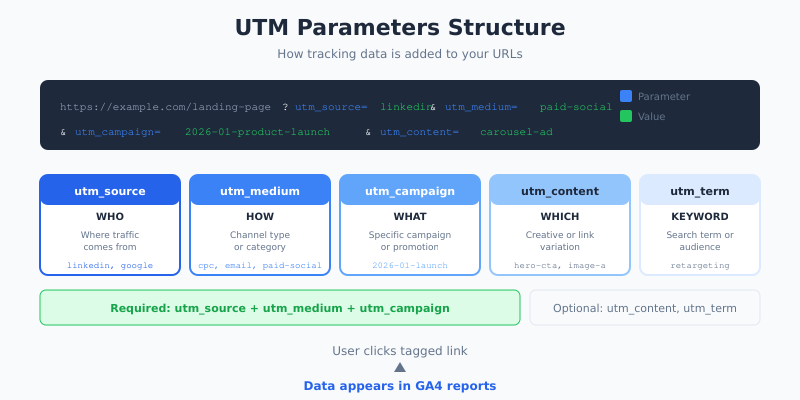
UTM parameters are tags you add to URLs to track where your traffic comes from. When someone clicks a tagged link, the parameters pass data to Google Analytics, showing exactly which campaign, channel, and creative drove the visit.
A tagged URL looks like this:
https://example.com/landing-page?utm_source=linkedin&utm_medium=paid-social&utm_campaign=2026-01-product-launch&utm_content=carousel-adEverything after the ? is tracking data. The page loads normally, but GA4 now knows this visitor came from a LinkedIn paid social campaign.
The Five UTM Parameters Explained
There are five UTM parameters. You don’t need all five for every link, but understanding each one helps you build a complete tracking system.
utm_source (Required)
Identifies who sent the traffic. This is typically the platform or website name.
- → Examples:
google,facebook,linkedin,newsletter,partner-site - → In GA4: Appears in Session source dimension
utm_medium (Required)
Describes the marketing channel type. This groups traffic by category regardless of source.
- → Examples:
email,cpc,paid-social,organic-social,display,affiliate - → In GA4: Appears in Session medium dimension
utm_campaign (Required)
Names the specific campaign or promotion. This is where you identify what you’re promoting.
- → Examples:
2026-01-product-launch,black-friday-sale,q1-webinar-series - → In GA4: Appears in Session campaign dimension
utm_content (Optional)
Differentiates links or creatives within the same campaign. Use this for A/B testing or when multiple links point to the same page.
- → Examples:
hero-cta,sidebar-banner,footer-link,image-a,image-b - → In GA4: Appears in Session manual ad content dimension
utm_term (Optional)
Originally designed for paid search keywords. Now often used for audience segments or additional identifiers.
- → Examples:
analytics-software,retargeting-audience,lookalike-2percent - → In GA4: Appears in Session manual term dimension
Why Naming Conventions Matter
GA4 is case-sensitive. Facebook, facebook, and FACEBOOK appear as three separate sources in your reports. Without strict naming conventions, your data fragments and becomes unreliable.
Common problems I see in audits:
- ✗ Same source spelled differently:
linkedinvsLinkedInvslinked-in - ✗ Inconsistent medium values:
emailvsEmailvse-mailvsnewsletter - ✗ Campaign names with no structure:
spring_salevsSpringSale2026vspromo-spring - ✗ Spaces in values:
paid social(breaks tracking entirely)
According to Improvado’s research, 30% of companies don’t use UTM markup in over 30% of their campaigns. That’s a massive blind spot in attribution data.
The Complete UTM Naming Convention
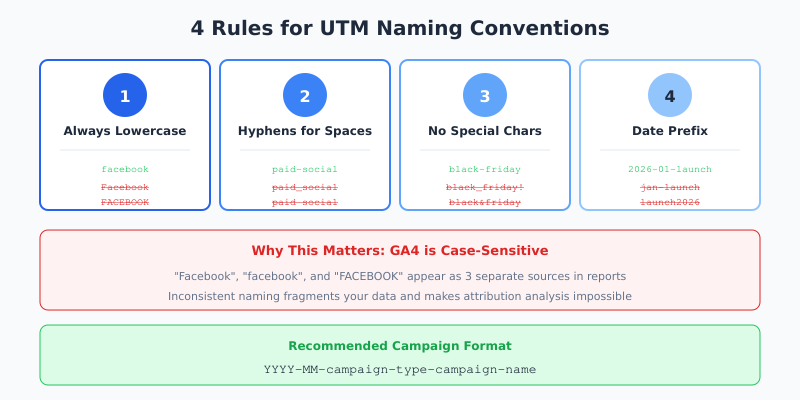
Here’s a standardized naming convention you can adopt today. It follows four core rules:
- 1 Always lowercase — No exceptions
- 2 Hyphens for spaces — Use
paid-socialnotpaid_socialorpaid social - 3 No special characters — Only letters, numbers, and hyphens
- 4 Date prefix for campaigns — Format:
YYYY-MM-campaign-name
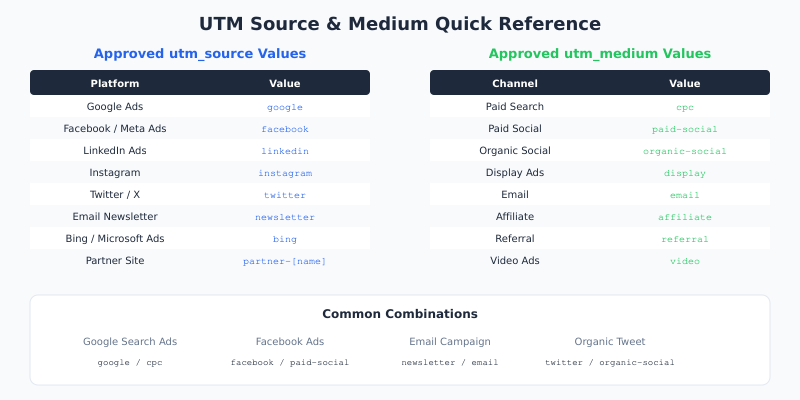
Approved utm_source Values
Use the official platform name, lowercase, no abbreviations:
| Platform | Correct Value | Wrong Values |
|---|---|---|
| Google Ads | google |
Google, adwords, gads |
| Facebook/Meta Ads | facebook |
fb, meta, Facebook |
| LinkedIn Ads | linkedin |
LinkedIn, li, linked-in |
instagram |
ig, insta, Instagram |
|
| Twitter/X | twitter |
x, Twitter, tw |
| Email newsletters | newsletter |
email, Email, mailchimp |
| Partner websites | partner-[name] |
affiliate, referral |
Approved utm_medium Values
Medium describes the channel type. Use these standardized values:
| Channel Type | Correct Value | When to Use |
|---|---|---|
| Paid search | cpc |
Google Ads search, Bing Ads search |
| Paid social | paid-social |
Facebook Ads, LinkedIn Ads, Twitter Ads |
| Organic social | organic-social |
Unpaid posts on any social platform |
| Display advertising | display |
Banner ads, GDN, programmatic |
email |
All email campaigns and newsletters | |
| Affiliate | affiliate |
Partner and affiliate links |
| Referral | referral |
Links from other websites (non-affiliate) |
Campaign Naming Structure
Campaign names should follow a consistent structure that makes filtering and reporting easy. I recommend this format:
YYYY-MM-campaign-type-campaign-nameExamples:
- ✓
2026-01-launch-analytics-tool - ✓
2026-03-webinar-ga4-migration - ✓
2026-11-promo-black-friday - ✓
2026-q1-nurture-free-trial
The date prefix lets you quickly filter campaigns by time period in GA4. The campaign type (launch, webinar, promo, nurture) helps categorize performance across different marketing activities.
Content and Term Values
For utm_content, describe the specific creative or link placement:
- → Ad creative:
carousel-1,video-testimonial,static-image-a - → Email placement:
header-cta,mid-article-link,footer-button - → A/B tests:
headline-a,headline-b,cta-green,cta-blue
For utm_term, use audience or keyword identifiers:
- → Audiences:
retargeting-30day,lookalike-1percent,interest-analytics - → Keywords:
utm-tracking,google-analytics-setup
Real-World UTM Examples
Here’s how the naming convention applies to common marketing scenarios:
Email Newsletter
https://example.com/blog/analytics-guide
?utm_source=newsletter
&utm_medium=email
&utm_campaign=2026-01-weekly-digest
&utm_content=featured-article
LinkedIn Paid Campaign
https://example.com/demo
?utm_source=linkedin
&utm_medium=paid-social
&utm_campaign=2026-01-launch-analytics-tool
&utm_content=carousel-testimonials
&utm_term=marketing-managers
Google Ads Search
https://example.com/pricing
?utm_source=google
&utm_medium=cpc
&utm_campaign=2026-01-brand-search
&utm_term=analytics-software
Organic Social Post
https://example.com/blog/utm-guide
?utm_source=twitter
&utm_medium=organic-social
&utm_campaign=2026-01-content-promotion
How to Implement UTM Tracking
Getting your team to follow UTM conventions requires tools and processes, not just documentation.
Step 1: Create a UTM Builder Spreadsheet
Build a shared Google Sheet with:
- ✓ Dropdown menus for approved source and medium values
- ✓ Campaign name field with format validation
- ✓ Formula that auto-generates the full UTM URL
- ✓ Historical log of all tagged URLs for reference
This prevents typos and ensures everyone uses approved values. Google’s Campaign URL Builder works for one-off links, but a shared spreadsheet provides better governance.
Step 2: Use a UTM Management Tool
For larger teams, dedicated tools like UTM.io provide centralized UTM management with team permissions, link shortening, and analytics integration. These tools enforce naming conventions automatically.
Step 3: Document Everything
Create a single reference document that includes:
- → All approved parameter values
- → Naming convention rules
- → Examples for each channel
- → Link to UTM builder spreadsheet
- → Contact for questions
Share this with every team member who creates campaign links. Review and update it quarterly.
Step 4: Audit Regularly
Check your GA4 traffic sources monthly for inconsistencies. Look for:
- ◆ Duplicate sources with different capitalizations
- ◆ Unknown or unexpected medium values
- ◆ Campaign names that don’t follow the convention
- ◆ (not set) values indicating missing parameters
When you find issues, trace them back to the source and fix the process that allowed them.
Common UTM Mistakes to Avoid
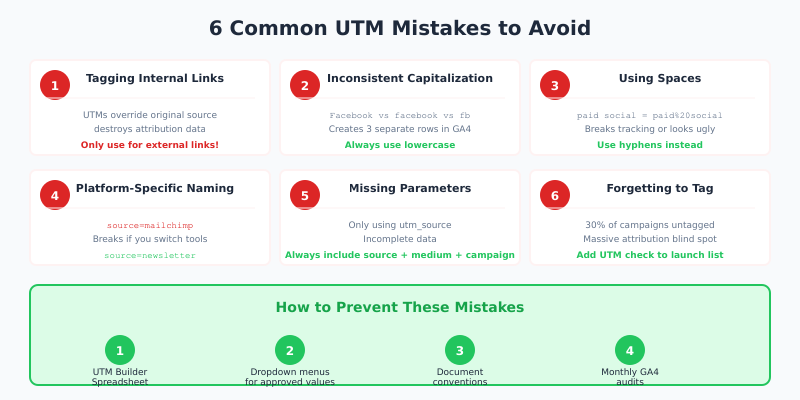
These errors appear constantly in analytics audits:
1. Tagging Internal Links
UTM parameters are only for external campaigns driving traffic to your site. Never tag links between pages on your own website. Internal UTM tags override the original traffic source, destroying your attribution data.
2. Inconsistent Capitalization
GA4 treats Facebook and facebook as different sources. Pick lowercase and enforce it everywhere. Use spreadsheet validation or UTM tools to prevent variations.
3. Using Spaces
Spaces in UTM values can break tracking entirely or get encoded as %20, making reports ugly and hard to read. Always use hyphens: paid-social not paid social.
4. Platform-Specific Naming
Don’t use mailchimp or hubspot as your source—these are tools, not traffic sources. Use newsletter or email instead so your data remains consistent if you switch platforms.
5. Missing Parameters
Always include source, medium, and campaign. Links with only utm_source provide incomplete data and make campaign analysis difficult.
6. Forgetting to Tag
The most common mistake is simply not tagging links at all. Make UTM tagging part of your campaign launch checklist. No link goes live without proper tracking.
UTM Parameters in GA4
In Google Analytics 4, UTM data appears in several reports:
- → Traffic acquisition: Reports → Acquisition → Traffic acquisition
- → User acquisition: Reports → Acquisition → User acquisition
- → Explorations: Build custom reports using Session source, Session medium, Session campaign dimensions
You can also create custom channel groups in GA4 that use your UTM medium values to categorize traffic. This is especially useful if GA4’s default channel groupings don’t match your marketing structure.
For advanced tracking, set up Google Tag Manager to capture UTM parameters as custom dimensions or push them to your CRM for closed-loop reporting.
FAQ
Are UTM parameters case-sensitive in GA4?
Yes. GA4 treats Facebook, facebook, and FACEBOOK as three separate sources. This is why naming conventions matter—inconsistent capitalization fragments your data into multiple rows, making analysis difficult.
Should I use underscores or hyphens in UTM values?
Use hyphens. While both technically work, hyphens are the standard convention and more readable in reports. paid-social is clearer than paid_social. Pick one style and use it consistently across all campaigns.
Do I need UTM parameters for Google Ads?
Not if you’ve enabled auto-tagging in Google Ads. Auto-tagging adds a gclid parameter that provides more detailed data than manual UTMs. However, some marketers use both for redundancy or to maintain consistent reporting across all paid channels.
Can I change UTM parameters after a campaign launches?
You can update UTM parameters on new links, but existing links will continue using the old values. There’s no way to retroactively change data already collected in GA4. This is why getting your naming convention right from the start matters.
How do I track the same link shared organically and in ads?
Create separate tagged URLs for each use case. The organic social post gets utm_medium=organic-social while the paid ad gets utm_medium=paid-social. Never share the same tagged URL across different channels.