
You sit down to analyze a week of data. You open the events report. And there it is: signupButton, sign_up_click, SignUp_New, and btn_signup_v2. Four names. One action. Zero useful insight.
I’ve cleaned up this exact mess for more companies than I can count. The root cause is almost never the analytics tool. It’s the lack of an event naming convention—a simple, agreed-upon rule for how you name the actions you track.
This guide shows you how to design a naming convention that survives team turnover, scales past a hundred events, and keeps your reports readable. No theory for theory’s sake. Just the framework I use on every implementation.
What Is an Event Naming Convention?
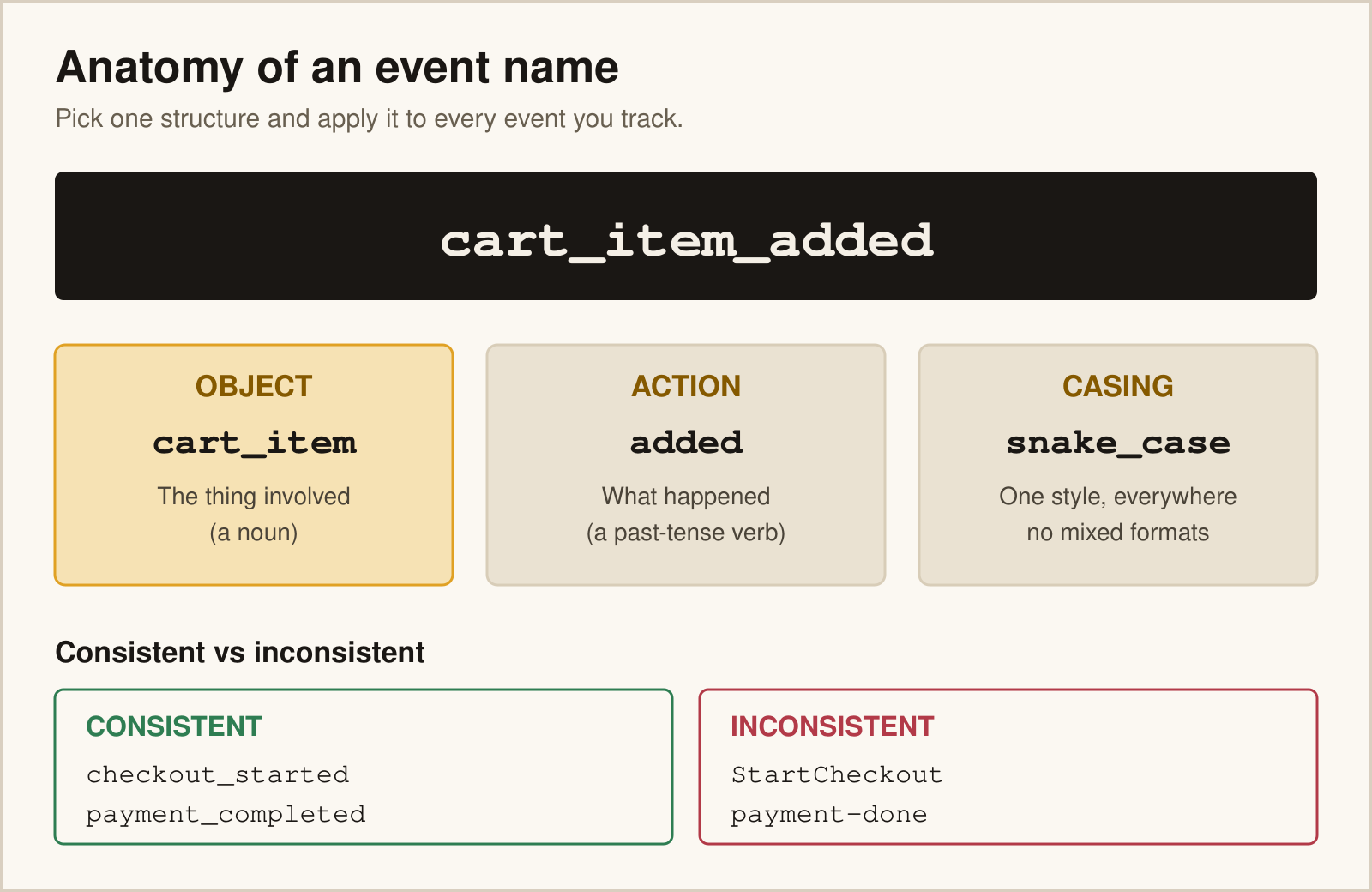
An event naming convention is a documented set of rules that defines how you name every tracked action. It covers the format, the casing, the vocabulary, and the order of words.
Think of it as grammar for your analytics. English has subject-verb-object. Your tracking should have its own predictable structure too. When every event follows the same pattern, anyone on the team can read a report and understand it instantly.
Here’s the difference a convention makes:
| Without a Convention | With a Convention |
|---|---|
ClickedBuy |
checkout_completed |
vid-play-2 |
video_played |
NEWSLETTER!! |
newsletter_subscribed |
The right column tells a story. The left column is a future support ticket.
The Object-Action Framework
The convention I recommend to almost every team is object_action. You name the thing the user interacted with, then the thing they did to it. product_viewed. cart_updated. form_submitted.
Why object first? Because it groups related events alphabetically. All your product_* events sit together. All your cart_* events sit together. Scanning a long list becomes effortless.
Three rules make this framework work:
- → Object first, action second.
order_completed, notcompleted_order. - → Use past tense for actions. The event records something that already happened.
viewed, notview. - → Keep objects as singular nouns.
product_viewed, notproducts_viewed.
Segment popularized this approach in their naming conventions guide, and it has aged well because it maps cleanly to how people think about actions.
Choosing a Casing Style
Casing is the part teams argue about most. There’s no universally correct answer—but there is one correct answer for your team: pick one and never deviate.
| Style | Example | Best For |
|---|---|---|
| snake_case | add_to_cart |
GA4, BigQuery, most modern stacks |
| Title Case | Add To Cart |
Segment, Mixpanel, Amplitude reports |
| camelCase | addToCart |
JavaScript-heavy custom setups |
If you run GA4, use snake_case. Google’s event name rules require lowercase, no spaces, and a 40-character limit. Picking snake_case from the start saves you a painful migration later.
Build a Controlled Vocabulary
A naming convention is only half the battle. The other half is vocabulary—the specific words your team is allowed to use.
Without a vocabulary, one person writes signup, another writes registration, and a third writes account_created. All three describe the same action. Pick one word per concept and document it.
- ✓ Decide between
signed_upandregistered—then ban the loser. - ✓ Standardize verbs:
viewed,clicked,submitted,completed,started. - ✓ Keep a living glossary in your tracking plan so new hires inherit the rules.
This is exactly where a well-built tracking plan earns its keep. It becomes the single source of truth for approved names.
Common Naming Mistakes to Avoid
1. Putting Variables in the Name
I see this constantly: product_viewed_shoes, product_viewed_hats, product_viewed_socks. Now you have hundreds of unique event names and no way to aggregate them.
The fix is simple. The category belongs in a property, not the name. Fire one product_viewed event with a category property set to shoes. Your event schema handles the details so the name stays stable.
2. Encoding the Page or Location
Names like homepage_cta_clicked and pricing_cta_clicked fragment your data. Use one cta_clicked event with a page property instead. You can always segment by page later.
3. Mixing Tenses and Formats
When page_view sits next to button_clicked sits next to Started Checkout, your reports look chaotic. Inconsistency is worse than an imperfect rule applied consistently.
4. Abbreviating Too Aggressively
You know sub_cmpl means “subscription completed” today. The analyst who joins in six months won’t. Spell things out. Clarity beats brevity.
5. No Enforcement
A convention nobody enforces is a suggestion. Add naming review to your QA process. Tools like Avo can block events that don’t match your defined schema before they ever ship.
Pros and Cons of a Strict Convention
| Pros | Cons |
|---|---|
|
|
A Naming Convention Checklist
- ✓ Pick a structure (
object_action) and apply it everywhere - ✓ Choose one casing style that matches your primary tool
- ✓ Use past-tense verbs for every action
- ✓ Move variable data into properties, never the name
- ✓ Document the rules in your tracking plan
- ✓ Enforce names in code review before launch
An event naming convention isn’t glamorous. But it’s the cheapest insurance you’ll ever buy for your analytics. Spend an afternoon defining it now, and you’ll save months of cleanup later.
FAQ
What is the best event naming convention?
The object_action format in snake_case works for most teams, especially on GA4. Name the object first, then the past-tense action—like product_viewed. It groups related events together and stays compatible with modern tools and warehouses.
Should event names use snake_case or camelCase?
Use whichever your primary tool prefers, then never mix. GA4 and BigQuery favor snake_case. Segment and Mixpanel reports often use Title Case. The specific choice matters less than applying it with zero exceptions.
Can I rename events after launch?
You can, but it breaks historical comparisons because old and new names won’t aggregate together. If you must rename, document the change date so analysts can account for the split. This is why defining names correctly upfront saves so much pain.
Where should I store my naming convention?
Keep it inside your tracking plan as a living document. Include the format rules, approved vocabulary, and examples. New hires should be able to read it and name a new event correctly without asking anyone.
How do I stop developers from inventing their own names?
Add naming review to your QA and code-review process. Governance tools like Avo can validate events against your schema and block non-conforming names before they ship. Enforcement, not good intentions, keeps data clean.